

bmidi: The challenges of designing a MIDI-To-Motion Engine
Showcasing bmidi, a MIDI animation system for Blender
Over the last few weeks, we’ve been developing bmidi, a node-based MIDI animation system for Blender. This project was inspired by Animusic, a now shutdown company specialized in musical animations.
Initial Progress
Before HRG, the repository was a small passion project with only a couple hundred lines of Python. The implementation consisted of “instrument and composition” logic that was wrapped into a small Blender UI panel.
An instrument classified one single object, that would then be animated. This animation could be a swing, rotation, or move, as long as it happened exactly when a MIDI note was played in a file. Compositions contained a collection of instruments, animating each one dynamically to its corresponding note. A composition withheld a prefix so that its instrument’s names would be in the format [prefix][note number].
As HRG was founded, we naturally inherited the repository to work on and maintain. bmidi needed a complete overhaul in order to become a proper animation system.
Frame Controller Logic
When we proposed ideas for bmidi’s new system, one idea remained apparent; frames. The idea is that a single MIDI note would trigger a collection of frames, animating those frames every time the note is played.
The frames give customizability, as an animation could be triggered before, after, or even during a note. Frames have individual properties, such as location, rotation (Euler), scale, so the full system behaved much like manual key-framing.
This idea worked flawlessly, as sequences of objects could be animated (by using the prefix syntax) and the animations were fully user-defined.
Robotics & Scheduling
The hole only dug deeper when we decided to explore robotic animations next (e.g. a robot playing a drum set)
At its simplest, a robot could be controlled by animating it’s hands. Blender handles the inverse kinematics, so bmidi’s job was to move the hand (IK target) to desired locations (note) on each note.
Given multiple arms in a robot (usually 2), we decided to implement a scheduling system. Our scheduling system could dynamically move arms depending on which were closest and which were busy.
The scheduling system worked in three ways:
- Find the closest arm: Compare each
handdistance tonote, sorting by the smallest distance first intocandidates. - Determine timing and choose another: If
candidates[0]move duration less than nextnotetime, use the next closest target (candidates[1]) - Return to home: If no next
noteor nextnotetime is greater thancandidates[0]return duration, return to original animation position.
While this system worked, it remained unstable due to issues with certain arms being naturally “favored” by the scheduler. The scheduler was later removed.
Back To Frames
What we hadn’t came across yet is that all development tied back to frames. There was almost an epiphany moment when it was realized that every note is just an individual animation. No fancy motion logic, no scheduling, just a set of keyframes.
Once this was established, the overhaul of an overhaul began, with the new frame logic being conceptualized.
The problem was that originally, the frame logic had a flow that looked like:
MIDI Data -> Objects -> FramesWe wanted a flow with frames and objects flipped, like:
MIDI Data -> Frames -> Objects The intention is that the system could gather frames by notes, effectively communicating “note 60 holds 10 frames animating object 1 and object 2”
A node editor was the natural solution
This flow practically wrote itself into a node editor, with Blender’s Python API assisting in the implementation of the editor itself.
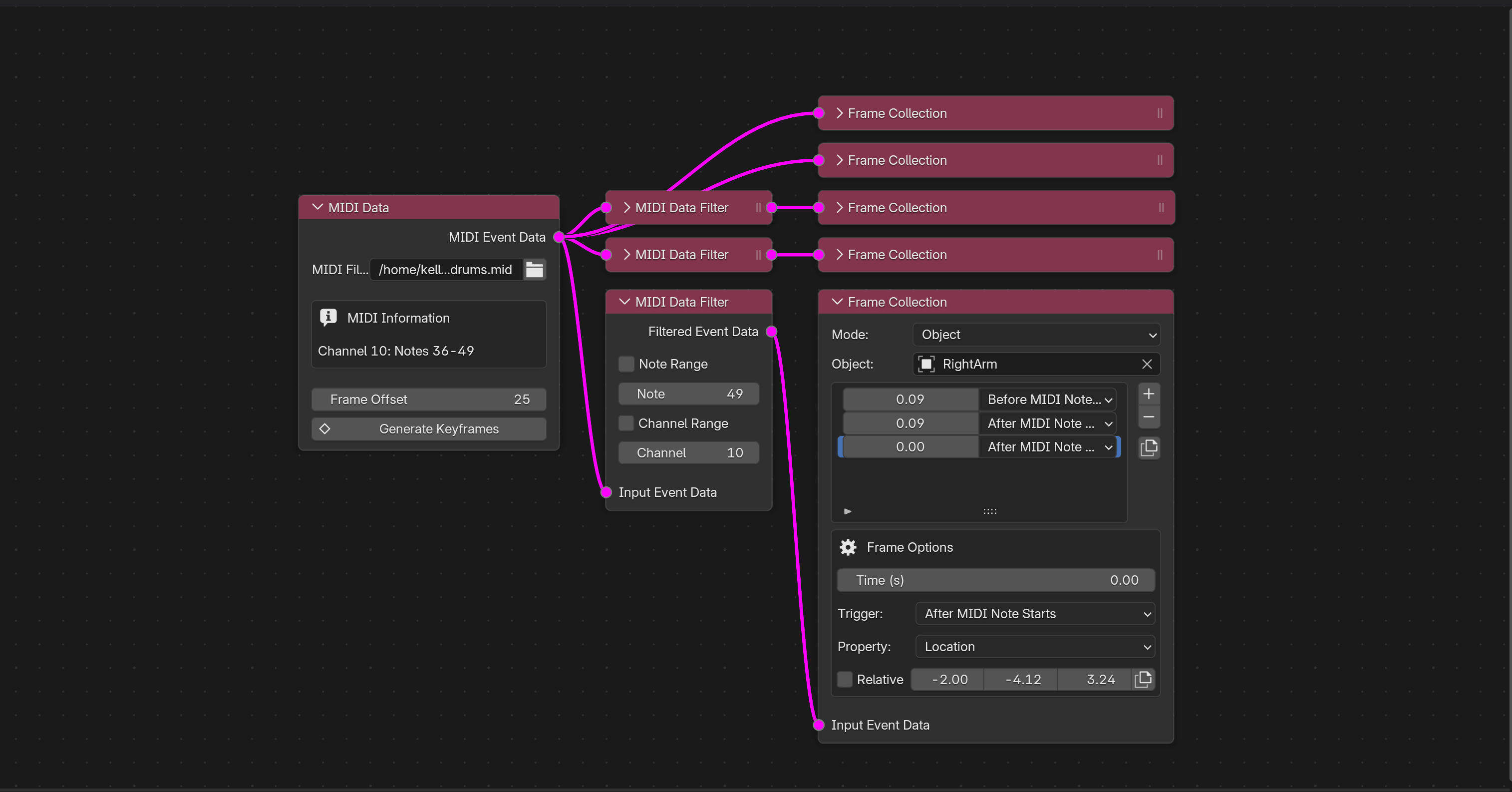
The node editor contains various node types to represent this flow, allowing a visual “graph” of the animation to be created.
MIDI Data: the “root” node of the graph, containing the MIDI file and data.MIDI Data Filter: a node for filtering input MIDI data based on a specific note and channel.Frame Collection: a node for animating objects given the input MIDI data.
MIDI Data Node
MIDI Data nodes contain a MIDI file and have an output for the parsed MIDI data.
MIDI Data Filter Node
MIDI Data Filter nodes filter input MIDI data based on a specified note and channel, outputting the filtered data.
Frame Collection Node
Frame Collection nodes describe a set of frames that occur during certain triggers (e.g., when a note starts)
These frames act either on a specific object, or a target prefix, where target prefixes are in the format [prefix][note number] (much similar to compositions mentioned above.)
You can read more about bmidi’s nodes here.
Why bmidi?
bmidi was created so that in-house software isn’t the only option to animating MIDI. While niche and not a profitable market, MIDI-To-Motion systems still remain behind closed doors (including Animusic’s ANIMUSIC studio and LLM’s MIDAS)
bmidi open sources the months of research and development typically put into a MIDI-To-Motion engine, all into a Blender-native node editor. Anyone can use it, for free.